Software & Product Systems · Business & Strategy
LMS — Bilingual Learning Management System
A bilingual (English/Khmer) learning management system for course delivery, assessment, communication, and academic analytics.
Can one bilingual workspace make course delivery, assessment, and student support calm enough for schools and training teams in Cambodia?
What problem this attacks
Teaching operations are scattered across chat apps, spreadsheets, and paper: course plans in one place, assignments in another, grades in a third, and student communication everywhere. For bilingual institutions, most off-the-shelf tools also assume English-only users.
Who it serves
Schools, universities, and training teams — with distinct role experiences for teachers, students, and administrators, in English and Khmer.
Why it matters
Academic operations software shapes how teachers spend their time. A workspace designed for the bilingual reality of Cambodian institutions lowers the barrier for schools that current LMS products treat as an afterthought.
What I actually did
My exact role
Sole builder of the public walkthrough prototype: interface design, the role-based teacher/student/admin views, bilingual English/Khmer UX, and the product framing pages.
Team contributions
Independent project.
What was researched and validated
Research
Looked at how existing LMS products assume English-only users, and at how Cambodian teaching operations actually run — scattered across chat apps, spreadsheets, and paper — to decide which workflows the walkthrough had to demonstrate end to end.
Validation so far
The product is deployed as a public walkthrough prototype and labels itself as such on its own interface. No school or training team is using it in real operations yet.
How the solution works
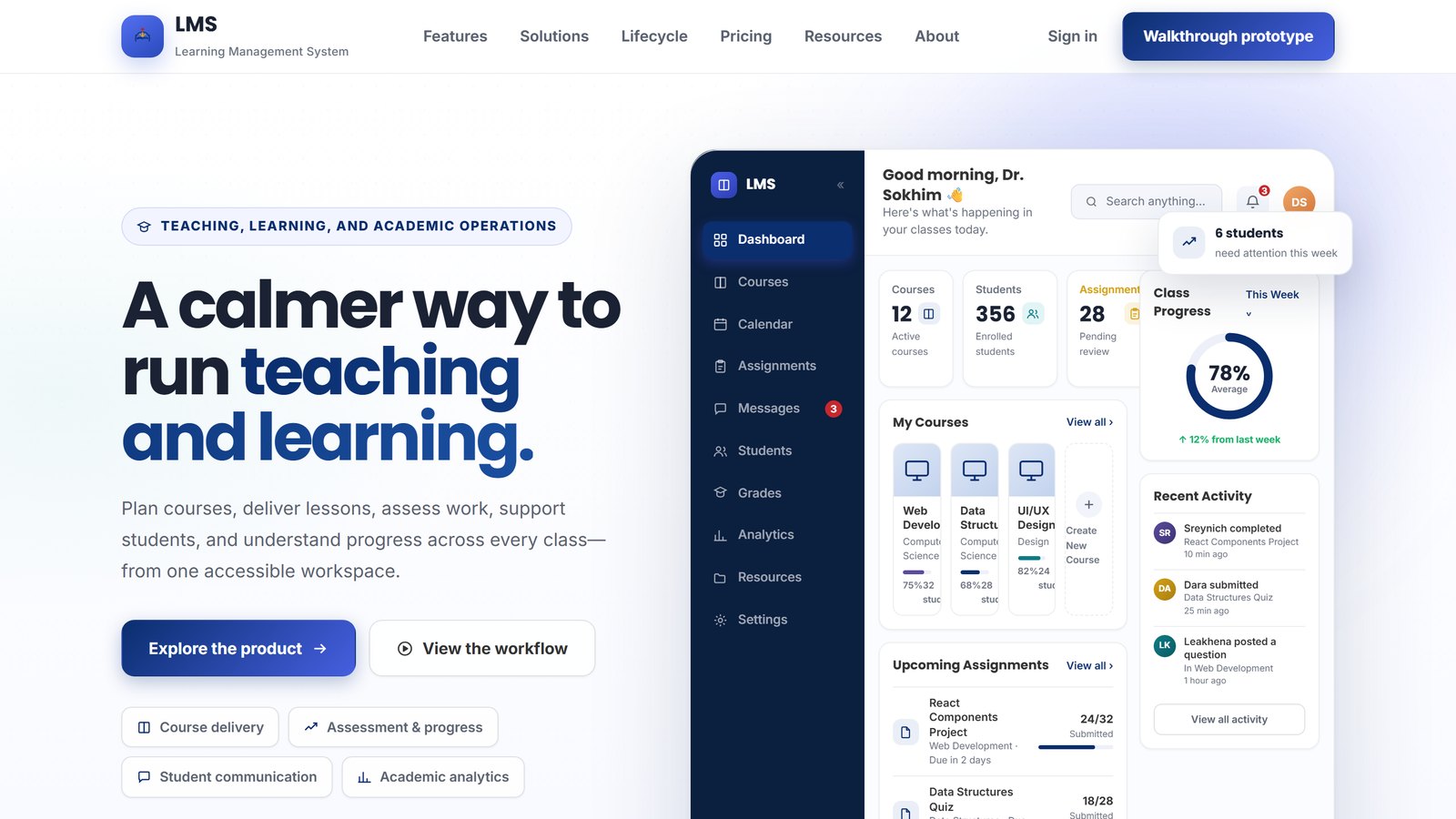
One accessible workspace covering the teaching lifecycle: plan courses, deliver lessons, assess work, message students, and track progress through academic analytics — with role-based views (teacher, student, admin) and full English/Khmer experiences.
User workflow
- A teacher plans a course and publishes lessons
- Students receive assignments and submit work
- Assessment and grades flow into per-class progress views
- Messages keep student communication inside the workspace
- Academic analytics summarize progress across every class
System architecture
Next.js application deployed on Vercel; the public walkthrough demonstrates the full interface with sample data. Backend, database, and auth details stay private with the source repository.
Methods
Role-based interface design (teacher, student, administrator), bilingual UX as a first-class requirement rather than a translation pass, and accessibility by default — responsive, keyboard-friendly, mobile-ready.
Business, rules, and risk
Business value
The prototype includes product framing beyond the software itself — features, solutions, lifecycle, and pricing pages — treating the LMS as a commercial product exploration, not just an interface exercise. Commercial viability remains untested until real institutions pilot it.
Contracts & policy considerations
A real deployment would sit on institutional contracts: service agreements with schools, acceptable-use terms for students, and clear data-processing commitments. Drafting those is part of taking this beyond a prototype.
Data & privacy
Student records are sensitive data. The public walkthrough runs on sample data only; a real pilot would need data-minimization, retention rules, and guardian-appropriate consent before any real student information enters the system.
Risks
- A polished walkthrough can be mistaken for a production system — the interface labels itself a prototype to prevent exactly that
- Student-data privacy failures would harm minors — which is why real data stays out until governance is designed
- Grading and progress displays must be verifiably correct before any institution relies on them
business model
How the LMS is priced
The commercial model published on the prototype itself. The pricing is designed and stated; it is not yet validated, because no institution has been billed.
| Field | Statement | Evidence |
|---|---|---|
| Unit of pricing | Per active learner, per year — an active learner is a student who signs in and engages with at least one course during the billing term. Staff accounts and archived accounts do not count. | |
| Classroom tier | Free forever, up to fifty active learners and three active courses — the complete teaching workflow, for one educator or a small training team testing it. | |
| School tier | Three US dollars per active learner per year, from one hundred learners upward, billed annually or monthly, with volume discounts. Adds departments and cohorts, staff roles, academic analytics, data export, bulk enrolment, and onboarding. | |
| Institution tier | Custom pricing, from two US dollars per active learner per year at scale, planned alongside integration and service work. Adds multi-campus structure, single sign-on, directory sync, and student-information-system integration. | |
| Who pays | The institution, not the teacher or the student — the free tier exists so a teacher can evaluate the full workflow before anyone is asked to buy anything. | |
| Where the cost sits | Onboarding, training, and integration work scale with the institution, not with the hosting bill — which is why the upper tiers are sold with service planning rather than as a bigger seat count. | |
| What is unproven | The revenue side entirely. The tiers are published product design, not tested willingness to pay: no school has piloted the system and no invoice has been issued. |
What exists and what the evidence shows
Technical decisions
- Next.js with a component-driven interface for the role-based views
- Bilingual English/Khmer experiences designed in from the start, not retrofitted
- Public walkthrough deployment with sample data, labeled as a prototype on the interface itself
- Accessible by default: responsive, keyboard-friendly, mobile-ready
Completed work
Pilot with a real school or training team
Planned
The receipts
The source repository is private.
Results
What limits it, and what I learned
Constraints (imposed)
- No real institution has piloted it, so every workflow assumption is unvalidated against actual school operations
- The privacy and consent design a real pilot needs does not exist yet
Tradeoffs (chosen)
- Building the full product surface first (including pricing) trades early validation for a complete demonstration HR and pilot partners can actually click through
- Sample data keeps the walkthrough safe but means no claim about real-data behavior can be made
Lessons learned
- Bilingual UX designed in from the start is far cheaper than retrofitting translations onto an English-only interface
- A complete clickable surface communicates a product better than any document — and invites honest feedback about what is missing
- Sample data keeps a public demo safe, but it also means every real-workflow claim has to wait for a real pilot
What gets validated next
- Run one walkthrough session with a real teacher or training coordinator and record what breaks
- Design the privacy, consent, and data-retention model before any real student data
- Test the Khmer experience with native-speaker students and teachers